3x3 Rubik's Cube Tutorial
- Want to learn how to solve a Rubik's Cube in 5 simple steps? This page is for you.
- No prior knowledge about Rubik's cubes or similar puzzles required or assumed.
- No need to memorize long sequences and algorithms.
- Intuitive explanation of every step so you understand the cube better, instead of blindly following moves without knowing why they work.
- Disclaimer: This tutorial might be a bit more verbose compared to other online guides, but it is for the sake of offering deeper understanding of what you are doing instead of just presenting a "just-do-it-don't-ask-questions" flowchart. If you just want to memorize some steps and begin solving ASAP, I recommend searching for one of the many other tutorials of that style instead.
- Ready? Click the "Concepts" tab above to get started.
We need to cover some preliminary cubing basics before diving into the 5-step solving process.
- A common misconception when one first attempts a Rubik's cube is believing it's about solving the 9x6=54 stickers.
- In some sense, it is, but the stickers are not independent things. They are heavily constrained to each other, and you should not consider them separately.
- If we carefully examine the Rubik's cube structure, we notice that it is made of just 21 pieces.
-
- 1 central core that holds the 6 center stickers.
- 12 edge pieces that have 2 stickers each.
- 8 corner pieces that have 3 stickers each.
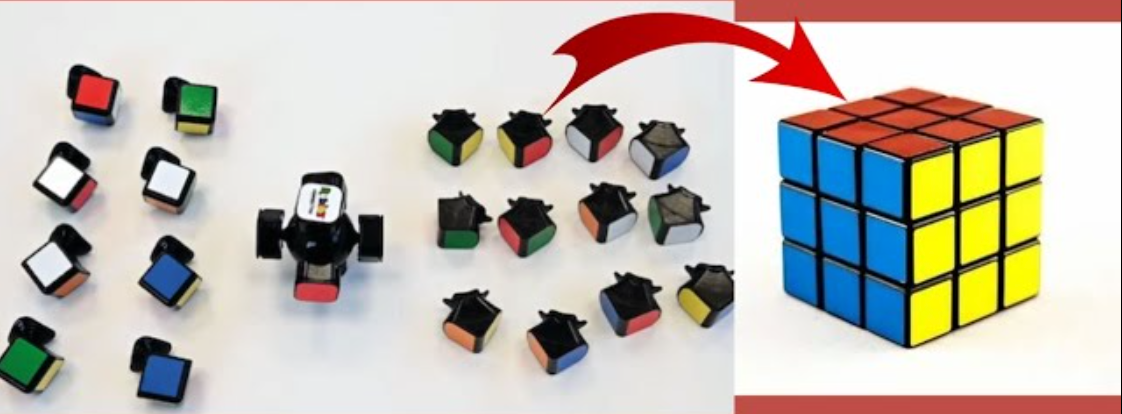
- The 20 edge/corner pieces are uniquely identified by their stickers and can only rotate about the core. The stickers can't "move" or "shift" within a single piece.
- Therefore, to "solve" a Rubik's cube, it means moving the 20 pieces into the correct places relative to the core. For this tutorial, we will basically solve one piece at a time, grouped into 5 steps.
- Optional note: You might have heard jokes about brute forcing a cube by peeling off the stickers. Actually, it is much less effort to brute force by just pulling out the 20 pieces and reassembling the cube. But come on, that's no fun.
-
To illustrate this way of viewing the cube, consider the following cube state. It's interactive. Feel free to drag with your mouse to play with the cube.
- A beginner might think, the white face is entirely solved! We are 1/6 of the way done, right? Well, the truth is, that is basically still a completely scrambled cube.
- Why? Because although the stickers are aligned on a face, their corresponding pieces are not in the right places. It's going to still take a lot of moves correct those pieces, and the stickers being aligned only on a single face is not actually real progress. In fact, depending on the solving strategy, being in that state can actually be worse than random in terms of move count needed to make real progress.
- An important skill to master is piece vision, which is the ability to efficiently find a piece with desired sticker colors, and efficiently identifying where that piece should eventually go.
- For example, in the cube state above, can you quickly find where the red-yellow edge piece is? And is it in the right final location? If not, where should it go?
- An easy way to figure out where a piece should go is to find the center stickers corresponding to its sticker colors. Recall that the 6 centers are one "piece", so they cannot move relative to each other. Therefore, you can treat the 6 centers as the source of truth for what the correct locations of other pieces are.
- This is pretty much all the background information you need. Click "step 1" above to dive into the 5-step solving tutorial.
Step 1: Solve the 4 edge pieces on the first layer
-
In this step, we want to solve 4 edge pieces around the white center and reach this state (gray means the piece is not relevant to this step)
- Optional note: This step is the easiest one, because you have maximum degrees of freedom on what moves you can make without affecting already solved pieces. As you progress with the solve, the degrees of freedom will get smaller, and it will become trickier to make moves without displacing other pieces.
- Optional note: You can technically start with any center instead of white, but it's tradition to learn by starting on white. Later, as you get more advanced, you can practice being color neutral, meaning being able to start on any center depending on which one is the easiest based on the scramble.
- The main strategy we will use for step 1 heavily employs an analogy that is also used in all future steps: children at a carousel.
- What is this analogy? This is important, please read carefully. Let's paint a scene. Imagine a group of children trying to get on a spinning carousel at the park. The carousel seats are high, so each child needs to line up and step onto a bench to reach the seats. The child on the bench waits for the carousel to spin until their favorite seat arrives, then they hop on from the bench. The next child gets on the bench, then rinse and repeat until all the seats are filled. Sometimes, a child is found already sitting in the carousel, but on the wrong seat or sitting backwards. They need to get off and get back on the right way. Since the seats are high and it is dangerous to jump off, they also need to exit by first stepping on a bench.
-
What did that story have to do with Rubik's cubes? You might have guessed that all the bolded words correspond to something on the cube.
Cyan layer = carousel, Magenta locations = seats, Pink locations = benches. The children are the 4 edge pieces containing a white sticker
- The carousel can always freely spin, as it will never mess up any already correctly seated pieces. You just have to make sure the pieces are seated correctly relative to each other.
- First, use your piece vision to find all 4 edge pieces with a white side on them. They could be anywhere on the cube, including already in benches and/or seats, where they could be in wrong seats or sitting backwards (flipped). Let's examine each case and see what we can do.
-
Case 1: Piece(s) already in carousel
If exactly one piece is already in the carousel and facing the right way (white up), this is the simplest case. Just designate this piece as "correct" and move on to another piece.
If multiple pieces are the in the carousel and facing the right way (white up), you need to check if they are placed correctly relative to each other. One easy way to check is simply spin the carousel around and see if all the pieces can line up with their corresponding red/blue/green/orange centers eventually. If they don't, select one of them as the "correct" piece, kick out all other pieces that are wrong relative to it into a bench, and proceed with case 2.
-
Case 2: Piece in bench
If a piece is already in a bench position, it is ready to enter the carousel with a single move. Spin the carousel until the correct seat aligns with the piece, then move the piece up, taking care to ensure white faces upwards. You can deduce the correct seat by examining the relative positions of the center colors and what correct pieces are already in the carousel.
Case 3: Piece in neither carousel nor bench
If a piece is neither in the carousel nor a bench, it must be at the bottom layer. You can easily convert this situation into case 2 as shown. You have to take care to first spin the carousel in a way that this manuever does not cause a correctly seated piece in the carousel to be kicked out.
- After you place all 4 white edge pieces into the carousel, spin the carousel until all edges align with their side centers (should look like goal state above). You are now done with step 1 out of 5.
Step 2: Solve 3 corner pieces on the first layer
-
In step 2, we want to solve 3 of the 4 corner pieces on the first layer to reach this goal state
- Optional note: You can choose any 3 of the 4 corners. It does not have to be the specific ones shown. Why do we not solve all 4? It will be explained in greater detail later, but basically we need to preserve some degrees of freedom for subsequent steps.
- For this step, it is easier to turn the cube upside down such that the yellow center is facing up.
-
For this step and also later steps, we need to learn a very important 4-move sequence called the trigger,
which looks like the first animation below. It also has a lefty trigger counterpart which is
the second animation. These two triggers are the building blocks of this entire solving method.
- Optional note: the term "trigger" comes from the phrase "pulling the trigger" on a gun, referring to how fast this sequence of moves can be executed and its satisfying nature. Speedcubers often spam trigger moves as a way to warm-up and also show off their TPS (turns per second).
-
Why is trigger the foundation of how this entire solving method? It has several useful
properties. One observation is that any single face rotation of the cube automatically affects eight
pieces (the center isn't really affected). If we perform the trigger on a solved cube and carefully
examine what pieces it affected, we quickly see the answer is seven pieces (see below). This
means that despite the trigger move involving four different intersecting moves, the net effect
on the cube is technically less than that of a single move. So, the "blast radius" of a trigger move is
relatively small. Moreover, the affected pieces span all 3 axis, not limited to a single face,
which means it has the potential to pull pieces across layers and different orthogonal faces, which is
useful for later.
-
For this step, we focus mainly on a specific local effect of the trigger, which is the swapping of
two front corner pieces. Press next move in groups of 4 to see the effect on the corners in action.
-
We can use this swapping behavior to solve the 3 white corner pieces. First we rotate the whole cube
so that the yellow side is facing up. Then we will apply the same carousel analogy from before,
except with different benches and different seats.
-
- Use piece vision to find a corner piece with white on it.
- Move the piece into one of the bench locations, and orient the cube such that bench is at the front-right corner, closest to you.
- Spin the carousel until the correct seat is aligned underneath that bench.
- Execute trigger to swap the bench with the carousel seat.
- Repeat 1-4 for another two corners
- Profit
-
If you followed the above, you might have noticed a few corner cases (pun intended).
- You put the corner piece in the right seat, but it doesn't look right. This is because corners have rotational orientation, and they can be in 1 of 3 different rotations. Only one of them is the right orientation (the one where the white side is facing the right way). Luckily for us, another effect of the trigger is that it changes both corner orientations while doing the swap. This means that you can spam triggers to swap the corners back and forth until the desired orientation is reached.
- A corner is already in the carousel but wrong seat/wrong orientation. How to do bullet 2 above?: This is left as an exercise to the reader to see if you really understood the previous material.
- After you place 3 white corner pieces into the carousel, spin the carousel until all white edges align with their side centers such that it looks like the goal state above. You are now done with step 2 out of 5.
Step 3: Solve 3 edge pieces on the second layer
- From here onwards, we permanently flip the cube so that the yellow center is up. This is because we want the easiest possible access to unsolved pieces. The white pieces are basically all solved already, so we can hide them away and not think about them anymore.
-
In step 3, we want to solve 3 of the 4 edge pieces on the second layer to reach this goal state.
- Unlike the previous step, you cannot choose any 3 of the 4 edge pieces to solve. You must solve the 3 edge pieces directly connected to the 3 corner pieces you solved previously. This should leave a whole column of unsolved pieces, which we refer to as the unsolved column. It might help to make a mental note of this, e.g. "ignore the green-red edge piece". Hold the cube such that the unsolved column is at the front-right as shown above.
- The strategy for step 3 is, you guessed it, to use the trigger and the carousel analogy again, with different mappings to locations on the cube.
-
Cyan layer = carousel, Pink locations = benches, Magenta locations = seats. The children are the 3 edge pieces that go into the second layer seats.
- Notice this time there are only 2 benches instead of 4. This is because we are no longer in a symmetrical situation. We have lost some degrees of freedom from placing the white pieces, and our space of moves is more constrained.
- In fact, the only moves you can technically make without messing up already solved pieces are the layer turns. Any other face turns will touch a previously solved white piece.
-
However, recall the trigger we learned from the previous step. It affects this region on the cube, which is convenient because we can fit the vertical part into the unsolved column, and all the affected locations are unsolved pieces. This means we can spam the trigger from this specific angle as many times as we want and no solved pieces are impacted.
-
So we can do triggers, but what does it buy us? We know from the previous step that it has this corner-swapping effect on the front corner pieces. What else does it do? It turns out, the trigger move does something very useful to the edge pieces in the affected zone. In particular, it cycles the three highlighted edge pieces counter-clockwise. Play the following animation over and over until you process this cycling behavior. Every 4 moves (or 1 trigger), the 3 edges cycle their original positions.
- This cycling behavior is very useful because one of the legs of the cycle moves an edge piece from the back of the top layer into the middle layer. That back position is one of the bench locations described previously. Similarly, the lefty trigger move done with the unsolved column on the left would move a piece from the other bench position into the second layer carousel, but with the edge piece flipped. The flipped-ness will be important later.
-
With all the above observations and thinking about it a little, we can easily deduce the following strategy for solving the 3 pieces.
- Use piece vision to find one of them (make sure it's not the one that corresponds to the unsolved column itself).
- Put the piece at a bench location*.
- Spin the carousel so that the correct seat for that piece is aligned at the unsolved column.
- Execute trigger to move the piece from the bench into the carousel.
- Repeat 1-4 above for 2 more edge pieces (not the one corresponding to the unsolved column.
- Profit
- Why is there an asterisk on "Put the piece at a bench location"? Because once again, there are corner cases. Ideally, the piece is currently on the top layer, and all you have to do is spin the top layer to put it in a bench. But the piece could also be in the carousel already, and in the wrong seat or flipped the wrong way. If this happens, no worries, just spin the carousel until the piece is at the unsolved column, then do a trigger which cycles the piece out and into the top layer, where you can easily place it into a bench.
- Which of the two benches should you use? Just try one of them. If the piece ends up being flipped the wrong way in the carousel after you do the trigger, take it back out with another trigger, then try the other bench. Remember to use lefty trigger for the back-left bench and the righty trigger for the back bench. Over time, you should be able to figure out a heuristic yourself for which bench to use without trial-and-error, but that is left as an exercise for the reader.
- Once all 3 edge pieces are placed, align the carousel such that the first two layer colors line up and your cube looks like the goal state at the top. You are now done with step 3 out of 5.
Step 4: Solve the 4 edge pieces on the last layer
-
In step 4, we want to solve the 4 edge pieces on the final layer to reach this state
- Optional note: The eagle-eyed among you might have noticed that an extra edge piece got solved in the above cube, the red-green piece. So it should be 5 pieces solved, not 4 right? It turns out that if you solve the 4 yellow edge pieces, you get the 5th for free, because it is the last edge piece and it's forced to be in the right place if all other pieces are.
- The strategy for step 3 is to again use the carousel analogy, except the carousel/bench/children again map to different things. We will also use a slightly modified version of the trigger.
-
Cyan layer = carousel, Pink locations = benches, Magenta locations = seats. The children are the 4 edge pieces containing a yellow sticker
- You might have noticed that there is only one bench this time. This is because at this point in the solve, we have lost almost all degrees of freedom. The only move we can do without affecting solved pieces is spinning the carousel.
-
Or is it? The unsolved column is still open, so we can technically still do triggers without affecting anything, right? Yes, technically true. But if you play around with the trigger a bit, you might find that it's not very helpful in making meaningful progress here. This is because the edge cycling behavior is not flexible enough and does not handle all the possible cases that can happen.
- We can slightly modify the trigger to add some flexibility. The structure of a trigger sequence is basically just "turn side face away", "spin top layer", "undo side move", "undo top move". Those "top moves" don't necessarily need to be just one quarter turn. You can actually do however many turns as you would like, as long as all the undo moves are done. The impact region slightly changes as you change the top moves, but the rest of the cube state is still preserved. We will call this more general sequence a modified trigger.
-
Let's break down what the modified trigger is doing to the pieces of interest. Notice that every time
you do the first side face turn, it has two effects:
- The benched piece enters the carousel
- A carousel edge piece gets "kicked out"
- The kicked out piece returns to the carousel, potentially in a different location
- A carousel piece gets moved into the bench, potentially a different piece from before
- The above observation is the basis for how we will solve this step. We keep executing modified triggers and kick out "wrong" pieces while ensuring that pieces that enter the carousel are "correct" as much as possible. An easy way to achieve this to just designate one piece as correct and solve all the other edge pieces around it.
- That strategy sounds pretty promising, but as usual there are "bad cases". Most bad cases can be handwaved away by "shuffling" the 4 edge pieces a bit with random modified triggers, then proceed again hoping the bad case went away. Slowly over time, you will build an intuition for what triggers to use to efficiently arrange the 4 edge pieces without luck or prayers. Enumerating all possible cases here would be tedious and also ruin the fun.
- There is one especially bad case that should probably receive a mention and a hint, and that's when three edge pieces are correctly in the carousel and the 4th edge piece is in the bench. If you play around with this case a bit, you will quickly realize what the problem is. You don't want to kick out any of the three already correct pieces, so the natural thing to try is kicking out whatever piece is in the 4th seat, and that seems correct since that's the seat the 4th edge piece needs to go in anyway. However, the undo of the side move will immediately bring the kicked out piece back, and one of the carousel pieces needs to also return to the bench. But which one? They are all in their correct seats now. Returning any one of them brings us back to the original state (3 correct, 1 in bench). If you run into this situation, here's a hint: you should start by kicking out one of the 3 correct pieces, designate the 4th piece as "correct", and re-solve everything around it.
- Once all 4 yellow edge pieces are placed, align the carousel such that their colors align with the side centers such that your cube looks like the goal state at the top. You are now done with step 4 out of 5. Almost there!
Step 5: Solve the final 5 corner pieces
- This is the final step, and then the cube will be solved! We all know what the goal state looks like, so no diagram this time. We just need to solve the remaining 5 corner pieces.
- At this point, you might have realized that there is basically no degrees of freedom anymore. Any move on the cube, including triggers, would affect at least one already-solved piece. So what can we even do here to influence the remaining pieces?
- What if I tell you the answer is still carousels and triggers?
- But it was just mentioned that triggers will ruin already solved pieces, so how can we still use them?
- By now you played around with triggers a lot, hopefully. You might have independently discovered another property of the trigger: doing 6 triggers in a row cancels themselves out. In other words, doing 5 triggers is the same as doing 1 trigger backwards. Or in general, doing n triggers is the same as doing 6k - n triggers backwards.
- That's neat, but how does it help us? We need to change the state of the cube to solve the remaining corner pieces, not do-nothing on it.
- One thing to consider is, what happens if we interpose other moves between triggers while doing the 6 of them? Kind of similar to the spirit of modified triggers where we mess with the middle moves to achieve similar but slightly different effects.
-
If you have another cube handy you might try the following: do 3 triggers, turn the bottom face once, do 3 more triggers, then turn the bottom face back. You might expect that this will mess up the cube a bit, but it turns out this whole thing only affected 3 corner pieces. This might remind you of the discussion about trigger sequences affecting fewer pieces than a single face turn. Remember modified triggers from the previous step? What we have done here is an even more general, mega modified trigger of the form (A) (B) (undo A) (undo B), where A and B can themselves be sequences of moves. The net effect of such compound sequences are usually quite a bit smaller than individual effects of A and B. These sequences are known as "commutators" in more technical parlance, but you can think of them just as a way to achieve localized effects on the cube.
-
We are going to leverage the above observation to solve the final 5 corner pieces. Flip the cube back over so that white is on top again and yellow is on the bottom, and that the unsolved corner on the white layer is at the front-right position. We are going to do a lot of triggers that will eventually cancel each other out, while sneaking in yellow layer carousel moves on the bottom such that the yellow corners get mixed up in the triggers, influencing their position and orientation. We will use the following carousel mapping:
Cyan layer = carousel, Pink locations = benches, Magenta locations = seats. The children are the 4 corner pieces containing a yellow sticker
- Recall from step 2 that one of the effects of the trigger is swapping two corners while rotating their orientations. We can use that to swap the bench piece into the carousel. If there is no yellow piece in the bench, simply do one trigger to bring a wrongly placed yellow corner piece from the carousel into the bench.
-
Once a corner piece is in the bench, spin the carousel such that the correct seat is directly underneath the corner piece (similar to step 2). Execute triggers to swap the two positions until the bench piece is seated in the carousel with the correct orientation (yellow down). Notice that while you do this, the cube appears to get messed up, but have faith that at the end, all these side effects will cancel out and return to a solved state. Once the bench piece is correctly placed into the carousel with the right orientation, the bench position will have a different piece in it, so the process can be repeated until all corners are solved. If nothing went wrong, all the triggers moves you did should cancel out (being a multiple of 6).
-
As usual, there is a pretty bad corner case (pun intended). It is uncommon but possible for the carousel to be completely solved, but the triggers have not yet cancelled themselves out, leaving a solved yellow layer but a messed up rest of the cube. Here, simply spin the carousel until its colors align with the side centers, and continue doing triggers until they actually cancel. This will mess up the carousel unfortunately, but if you did it right at the end only 2 corner pieces overall will remain unsolved.
However, the two unsolved corners are not on the carousel. They are along a different axis, so we cannot use the same trigger cancellation trick to solve them. What we can do is execute a front face move such that the two unsolved corners go onto the carousel, then do the above to solve the two corners (note that they are no longer yellow-face down, they should be green-face down), then undo the front face move.
- Congratulations! You solved a Rubik's cube.
Now that you know how to solve a Rubik's cube, what's next?
-
Direction 1: Get faster
This is the most popular direction people take after learning a beginner's method. Speedcubing is a popular activity and can get very competitive. It is also a nice party trick to impress your friends by solving a cube in 10-20 seconds or so. The best solvers in the world can consistently solve in under 10 seconds or even under 5 for the top elites. The method explained in this tutorial is not very optimized, as you might imagine. With some dedicated effort and practice you might be able to get this method to sub-1 minute, but you will plateau quickly, as the move count is simply too high. In order to get faster you would need to improve on: 1) efficiency, which means low total move count, often involving solving more than 1 piece at a time and memorizing specialized algorithms, 2) mechanics, which means better turning and finger tricks to increase the execution speed, requiring a lot of practice, 3) hardware, which means acquiring dedicate speedcubes optimized for going fast, including features like corner cutting and magnetic self-alignment.
If you want to go down this journey, I recommend starting by looking up the CFOP method, which by most metrics is the fastest solving method today, or at least the fastest ceiling depending on how deep you go in it. This is the method I mainly use, and the vast majority of the top solvers in the world use it. -
Direction 2: Try other puzzles
The 3x3 Rubik's cube is really only one of hundreds of variants of twisty puzzles out there. It's definitely the most iconic, but there are other interesting puzzles as well. There are larger variants such as 4x4, 5x5, all the way up to a large number that keeps getting larger every week. There are different shapes of puzzles such as the minx series (Pyraminx, Megaminx, etc.), and different turning mechanisms such as Skewb, Square-1, etc. You will find that many such puzzles, despite looking vastly different, share a lot of common principles such as solving piece-by-piece and managing your degrees of freedom. -
Direction 3: Come up with your own way to solve
This tutorial relied heavily on triggers to influence pieces, but that's not the only way. We briefly discussed commutators in the final step as a way to "create" localized effects on the cube, but the rabbit hole goes quite deep, and a solid grasp of cube theory can give you superpowers to create your own solving methods. You can then publish the method and show the world how smart and awesome you are. Popular methods are often named after their creators (Fridrich, Petrov, Roux, etc).